Roam

Voice-controlled chess using Ollama.

https://github.com/abaj8494/ollama-voice-chess
Notes
Backend
the tech-stack used FastAPI on the back-end. usually I use Flask for everything, but the requirements of this project are asynchronous, real-time requests.
| Feature | FastAPI | Flask |
|---|---|---|
| Speed | Very fast (async, based on Starlette) | Slower (sync by default) |
| Async support | Native async/await | Requires extensions |
| Type hints | Required, powers validation | Optional |
| Auto docs | Built-in Swagger UI at /docs | Manual setup |
| Validation | Automatic via Pydantic | Manual or extensions |
| WebSockets | Built-in | Requires Flask-SocketIO |
Frontend
the front-end was refactored from one huge index.html file into a Svelte front-end served with Vite.



- check if Mac is using the new DNS
scutil --dns | grep nameserver- force DHCP renewal
sudo ipconfig set en0 DHCP
automatic DHCP:
sudo networksetup -setdhcp Wi-Fi
sudo networksetup -setdnsservers Wi-Fi empty
manually DHCP:
sudo networksetup -setmanual Wi-Fi 192.168.1.50 255.255.255.0 192.168.1.1
sudo networksetup -setdnsservers Wi-Fi 192.168.1.100 2001:8004:52b1:6a76:afea:99a1:1790:2aee
- to find which process is hogging which port
  # macOS/Linux:
  lsof -i :8765

  # Alternative using netstat:
  netstat -an | grep 8765

  # Using ss (Linux):
  ss -tlnp | grep 8765
import numpy as np
import matplotlib.pyplot as plt

#params
r_min, r_max = 2.5, 4.0
n_r = 10000
n_transient = 1000
n_last = 100

r = np.linspace(r_min, r_max, n_r)
x = 0.5 * np.ones(n_r)

for i in range(n_transient):
    x = r * x * (1-x)

r_list = []
x_list = []

for i in range(n_last):
    x = r * x * (1-x)
    r_list.append(r)
    x_list.append(x)

r_plot = np.array(r_list).flatten()
x_plot = np.array(x_list).flatten()

plt.figure(figsize=(12,8))
plt.scatter(r_plot, x_plot, s=0.1, c='black', alpha=0.1)
plt.title('Bifurcation Diagram of the Logistic Map')
plt.xlabel('Growth Rate ($r$)')
plt.ylabel('Population ($x$)')
plt.xlim(r_min, r_max)
plt.ylim(0,1)
plt.grid(False)

plt.show()
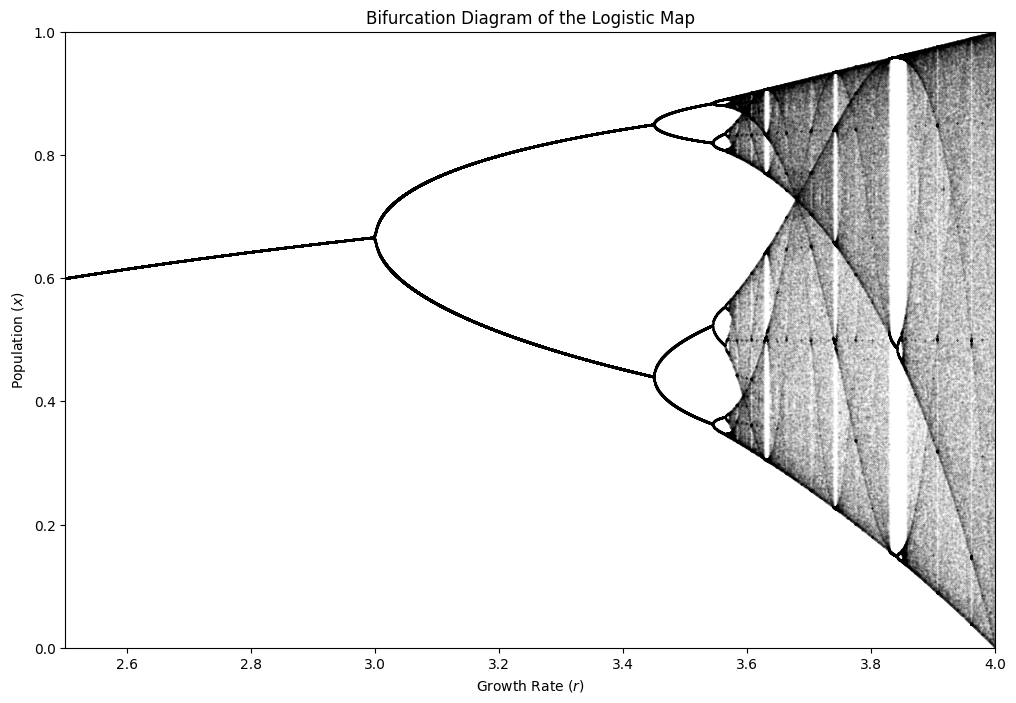


Backlinks (1)
“We all die. The goal isn’t to live forever, the goal is to create something that will.” — Chuck Palahniuk
Originally the AI suffix stood for archived intellect, however these days it has concretised to becoming an Augmenting Infrastructure — a place from which to branch out in many directions.
Within this site you will find self-contained material in the form of project posts and blog posts, but also external links 1 to other work – my own as well as not.